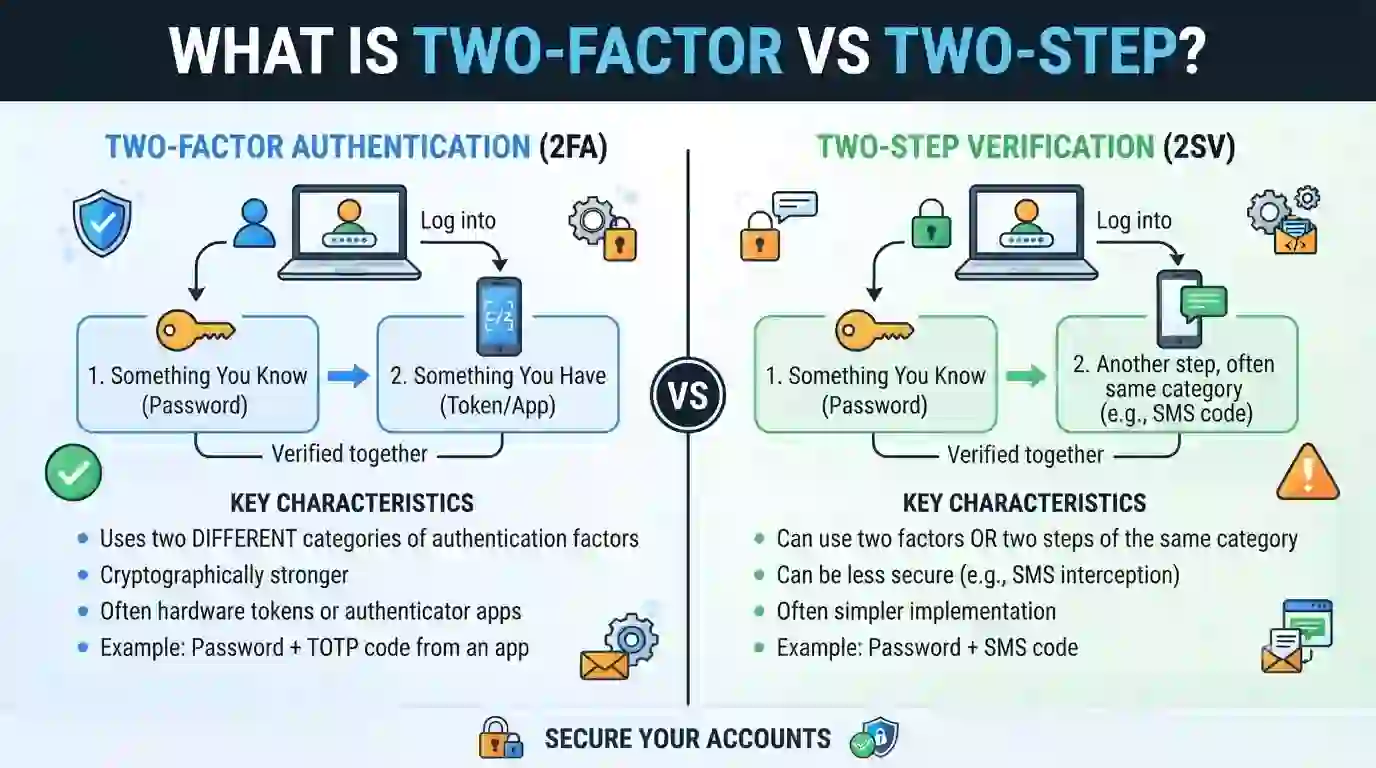
What Is Two-Factor vs Two-Step Verification? Definition & Meaning Explained
Your password alone won’t stop a hacker anymore. Data breaches leak millions of logins every month, and criminals reuse those same passwords across your email, banking, and social accounts. Most people hear two-factor authentication and two-step verification and assume the terms mean the same thing, then pick the weaker option without knowing it. This guide answers what is two factor vs two step in plain language, with a full comparison table and clear setup steps.
Quick Answer: In a nutshell, two-factor authentication (2FA) requires two distinct forms of proof: something you possess or are, such as a fingerprint or phone, and something you know, such as a password. Two-step verification (2SV) requires two steps in a row, but both steps can come from the same type of proof, such as a password followed by a security question. Every 2FA login is technically a 2SV login. Not every 2SV login qualifies as true 2FA.
About This Guide
This article draws on primary guidance from the National Institute of Standards and Technology’s Digital Identity Guidelines, Google’s official account security documentation, and the Cybersecurity and Infrastructure Security Agency’s multi-factor authentication resources. [Add your author name, credentials, and publish date here before this goes live.]
What Is Two-Factor Authentication? (Definition & Meaning)
Two-factor authentication, often shortened to 2FA, is a login method that checks two separate categories of proof before granting access. The National Institute of Standards and Technology (NIST) defines authentication around three core categories:
- Something you are familiar with, such as a PIN, password, or security question response.
- Something you have — your phone, a hardware security key, or an authenticator app tied to your device.
- Something you are — a fingerprint, face scan, or voice pattern.
True two-factor authentication pulls from two separate items on that list. A password plus a fingerprint scan qualifies. A password plus a PIN does not, since both fall under “something you know.” NIST’s own digital identity guidelines make this exact point: a memorized PIN and a password do not count as two factors, because they belong to the same category. That distinction sits at the heart of the entire two factor vs two step conversation.
What Is Two-Step Verification? (Definition & Meaning)
Two-step verification, sometimes labeled 2SV, describes any login flow with two sequential checks. Unlike 2FA, it does not require those checks to come from different proof categories. A typical 2SV flow looks like this:
- Step one: enter your password.
- Enter a one-time code via email, push notification, or text message in step two.
Interestingly, Google’s own account security documentation treats “2-Step Verification” and “two-factor authentication” as interchangeable names for the same feature. That naming choice shows how loosely major platforms use these words in everyday products, even though security professionals draw a sharper technical line between them. Knowing this helps explain why so many people search for what is two factor vs two step in the first place — the industry itself blurs the two terms.
What Is Two Factor vs Two Step? The Core Difference Explained
The real difference in the two factor vs two step comparison comes down to variety, not quantity. Two-factor authentication always mixes two different types of proof. Two-step verification only guarantees two rounds of proof, and those rounds might repeat the same type twice.
Here’s the distinction laid out plainly:
- 2FA = two different factor categories, always.
- 2SV = two verification steps, and the category can repeat.
- Every 2FA process also counts as a 2SV process.
- Not every 2SV process qualifies as true 2FA.
Picture a banking app that asks for your password, then a secret question about your childhood pet. That app runs two-step verification, because you complete two steps before logging in. It does not run two-factor authentication, because a password and a security answer both live in the “something you know” category. Understanding what is two factor vs two step in this kind of real example makes the theory click faster than any dictionary definition.
Two-Factor Authentication vs Two-Step Verification: Full Comparison Table
| Aspect | Two-Factor Authentication (2FA) | Two-Step Verification (2SV) |
|---|---|---|
| Core requirement | Two different factor categories | Two verification steps (same or different category) |
| Typical factor mix | Knowledge + possession, or knowledge + inherence | Often knowledge + knowledge |
| Common example | Password + fingerprint scan or security key | Password + email or SMS code |
| Security strength | Higher; resists a wider range of attacks | Moderate; weaker if both steps share one category |
| Vulnerable to SIM swaps | Rarely, if a hardware key or biometric is used | Often, when SMS is the second step |
| Common tools | Security keys, authenticator apps, biometrics | SMS codes, email codes, security questions |
| Setup speed | Slightly slower on first-time setup | Usually quicker to turn on |
| Best suited for | Banking, primary email, work accounts, crypto wallets | Low-risk apps, forums, backup recovery layers |
| Regulatory alignment | Meets higher NIST assurance levels (AAL2/AAL3) | May only satisfy the lowest assurance level (AAL1) |
How Two-Factor Authentication Works, Step by Step
- You enter your username and password — that’s “something you know.”
- The system requests a second proof from a different category.
- You provide it: a code produced by an authenticator app installed on your device, a fingerprint scan, or a tap on a physical security key.
- The system checks both proofs and only grants access when both match.
Each step must fail on its own for an attacker to break in. A stolen password does nothing without your phone, key, or fingerprint alongside it.
How Two-Step Verification Works, Step by Step
- You enter your password.
- The service sends a one-time code by text, email, or push notification.
- You type that code into the login screen within its short time window.
- Access opens once the code matches.
Two-step verification blocks casual password guessing effectively. It offers less protection against attackers who already control your email or phone number, since that second step frequently routes through the same device a criminal could already access.
The Three Authentication Factors You Should Know
Every discussion of what is two factor vs two step eventually traces back to three building blocks:
- Knowledge factors — passwords, PINs, security answers.
- Possession factors — phones, hardware keys, smart cards.
- Inherence factors — fingerprints, face scans, retina patterns.
NIST’s Digital Identity Guidelines (Special Publication 800-63B) treat these three categories as the foundation for authentication systems ranging from consumer apps to federal networks. Some vendors now market behavioral signals, like typing rhythm or location, as a possible fourth factor, though NIST has not formally adopted that as a standalone category.
Why the Two Factor vs Two Step Debate Actually Matters
Choosing between two factor vs two step affects how well your account survives a real attack, not just how the setting looks on a menu screen.
- If a hacker phishes your password and your email recovery method relies on another knowledge-based check, a 2SV setup built entirely on “something you know” can fall in a single attempt.
- True two-factor authentication forces that same attacker to also steal a physical device or spoof biometric data, which is a far harder task.
- The Cybersecurity and Infrastructure Security Agency (CISA) states plainly that any multi-factor authentication beats none at all, while phishing-resistant methods, like security keys, offer the strongest protection currently available.
This is the practical reason security teams push users past basic 2-step codes and toward genuine multi-factor setups wherever an account holds real value.
Real-World Examples: Two-Factor and Two-Step in Everyday Apps
- Gmail — password plus a Google prompt on your phone, or a physical security key.
- Major banks — password plus a one-time SMS code sent to your registered number.
- Microsoft 365 — password plus an approval tap inside the Microsoft Authenticator app.
- Apple ID — password plus a code delivered to a trusted Apple device.
- Crypto exchanges — password plus an authenticator app, often required rather than optional.
Notice how the same platform sometimes offers both a true two-factor option and a simpler two-step option under one settings menu. That overlap fuels most of the everyday confusion around what is two factor vs two step, even among people who consider themselves fairly tech-savvy.
Which Is Better for You: Two-Factor or Two-Step?
- Choose true two-factor authentication for: banking apps, your primary email address, work accounts, cloud storage, and crypto wallets.
- Low-value accounts like newsletter sign-ups, informal forums, or as a backup layer in conjunction with more robust 2FA elsewhere are suitable uses for two-step verification.
Make use of the strongest choice that your account settings provide. Most major platforms quietly label their strongest option as a security key or authenticator app, not a text message, so look past the default choice during setup.
Common Mistakes That Weaken Your 2FA or 2-Step Setup
- Relying only on SMS codes, which criminals can intercept through SIM-swap scams.
- Storing backup codes in an unlocked notes app on the same phone used to log in.
- Reusing one phone number as the recovery method across every single account.
- Skipping backup codes entirely, then losing account access the day a phone breaks or gets stolen.
- Turning on basic two-step verification while ignoring a true two-factor option sitting one menu deeper.
Each of these habits turns a genuine security layer into a checkbox with little real protection behind it.
How to Turn On Two-Factor Authentication (Quick Setup Guide)
- Open the security settings inside your account.
- Look for an option that says “Login Verification,” “2-Step Verification,” or “Two-Factor Authentication.”
- Choose an authenticator app or a physical security key over SMS whenever that option exists.
- Scan the QR code shown on screen using an app such as Google Authenticator, Microsoft Authenticator, or Authy.
- Save your backup codes somewhere offline, like a printed copy stored in a locked drawer.
- Test the new setup once by signing all the way out, then back in.
Best Practices to Keep Your Accounts Locked Down
- Turn on strong authentication for your email account first; it protects every password reset link tied to your other accounts.
- Prefer an authenticator app or hardware key over SMS whenever a service gives you the choice.
- Keep one printed set of backup codes in a safe, offline location away from your phone.
- Review connected devices and active login sessions every few months and remove anything unfamiliar.
- Pair strong authentication with a password manager so you never repeat one password across multiple accounts.
Frequently Asked Questions About Two-Factor vs Two-Step Verification
1. What is two factor vs two step verification in simple terms? Two-factor authentication asks for two different types of proof, such as a password plus a fingerprint. Two-step verification asks for two rounds of proof, which can both come from the same type, such as a password plus a security question.
Are two-factor authentication and two-step verification the same thing? Not always. Every true 2FA setup also qualifies as 2-step verification, but a 2SV setup only counts as genuine 2FA when its two steps come from different proof categories rather than repeating one category twice.
3. Which is more secure, 2FA or 2-step verification? True two-factor authentication is generally stronger, because it forces an attacker to defeat two separate types of security rather than guess two password-like codes in a row.
4. Can I use two-factor authentication without a phone? Yes. Hardware security keys, such as a YubiKey, plug directly into your device and work without a phone number or app, which also protects you from SIM-swap attacks that target text-message codes.
5. What happens if I lose access to my second factor? Most services let you fall back on printed backup codes or a pre-set recovery email, so generate and store those codes before you ever actually need them.
6. Do all apps and websites support two-factor authentication? No. Coverage still varies widely. Major email, banking, and work platforms almost always support it, while smaller or older websites may only offer basic two-step verification, or nothing at all.
Final Thoughts
Two-factor authentication and two-step verification both add real protection over a bare password, but they are not identical tools. 2FA demands two different kinds of proof; 2SV only guarantees two rounds of proof, sometimes from the same category. Now that you know what is two factor vs two step, open your account settings today and switch every important login toward an authenticator app or physical security key. Your future self will thank you the day a stolen password shows up in a breach list and leads nowhere.